Save 5 Minutes on Every Trade
ChartBridge calculates position size and leverage in 0.3 seconds. What used to take 5 minutes of manual math now happens automatically.
Join Free Beta - 2 Min SetupNo credit card • Free forever • Chrome extension
The Problem Every Futures Trader Knows
Manual Position Sizing
Spending 5+ minutes calculating position size, leverage, and risk for every single trade
Costly Mistakes
One calculation error = overleveraged position = account blown
Missed Opportunities
By the time you finish calculating, the perfect entry is gone
Manual Trading vs ChartBridge
❌ Manual Trading
✅ With ChartBridge
Result: Save 45 minutes per day, eliminate calculation errors, never miss an entry again.
Smart Position Sizing
Enter your risk percentage (e.g., 2%). ChartBridge calculates position size and leverage in 0.3 seconds. Zero manual math. Zero calculation errors.
See It In Action
Real screenshots of ChartBridge working inside TradingView
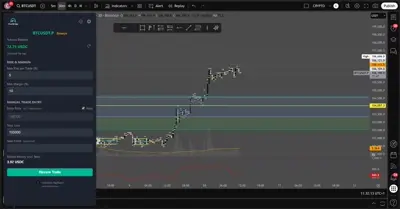
1. Set entry, stop-loss, and risk on the initial screen
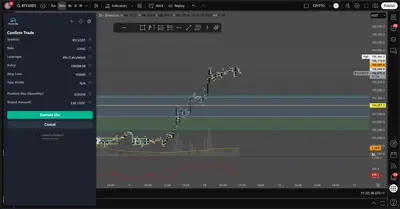
2. Review position calculation and execute trade
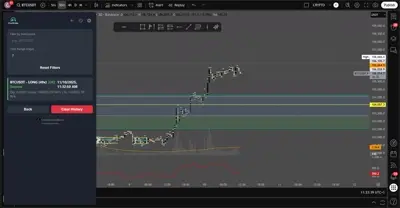
3. View history of trades executed via the extension
Everything Else You Get
3 Orders in 1 Click
Entry, stop loss, take profit. One click vs 10+ manual clicks.
Zero Tab Switching
Trade directly from TradingView. Save 30 seconds per order.
Live Balance Display
Real-time account balance in your preferred currency.
Complete Trade Log
Every trade recorded with timestamps, prices, and execution status.
Zero-Storage Security
API keys never stored. Used per-request, then discarded.
Built-in Risk Controls
Max risk per trade + margin limits = protected account.
Frequently Asked Questions
Is ChartBridge really free?
Yes, completely free during beta. No credit card required. No hidden fees. We're building this for traders, by traders.
Is my API key safe?
Your API key is used only to execute trades and is never stored anywhere. It's processed per-request and immediately discarded. Use IP whitelist on Binance for extra security.
What if I make a mistake?
You review every trade before execution. ChartBridge shows you exact position size, leverage, entry, stop loss, and take profit. You confirm before anything goes live.
How long does setup take?
2 minutes. Install Chrome extension, add your Binance API key, and you're ready to trade. No complex configuration needed.
Does it work with my trading style?
If you trade Binance Futures and use TradingView charts, yes. Works with any timeframe, any strategy, scalping to swing trading.
What happens after beta?
Beta users get lifetime access at any pricing we introduce later. You're helping us build this, so you'll be rewarded.
Quick Start
Install the Extension
Load the ChartBridge extension in Chrome from the extension folder (Developer Mode)
Configure API Keys
Enter your Binance Futures API key and secret in the extension settings
Open a Chart
Navigate to any Binance Futures pair on TradingView
Place a Trade
Enter entry, stop loss, take profit and click "Review Trade"
Confirm & Execute
Review the summary and click "Confirm & Execute" to place the trade
Installation Guide
1. Install ChartBridge Extension
-

- Click "Add to Browser"
- Confirm the installation
- The extension is now installed in your browser
2. Generate Binance API Keys
- Go to Binance API Management
- Create a new API key
- Enable "Futures Trading" permission
- Restrict to IP addresses if possible for security
- Copy the API Key and Secret Key into ChartBridge settings
Documentation
Key Concepts
- Bracket Orders: A combination of an entry order plus a stop loss and take profit order executed together
- Hedge Mode vs One-way Mode: ChartBridge automatically detects your account mode and adjusts order parameters accordingly
- Position Sizing: The extension calculates position size based on your risk percentage and margin limits
- Leverage: Automatically capped at your account's maximum leverage for the pair
Risk Management
- Set a maximum risk percentage per trade
- Configure maximum margin usage to protect your account
- All calculations include estimated trading fees
- Review trade summary before execution
Security Best Practices
- Browser Storage Warning: Your API keys are stored in your browser's local storage. This is accessible to malware on your machine. Ensure your computer is secure and protected with antivirus software.
- Never share your API keys
- Use IP whitelist on Binance API keys when possible for additional protection
- Disable "Allow Withdraw" permission on your API key to limit damage if compromised
- The backend never stores your API credentials - they're only transmitted per-request and immediately discarded
- Consider using a dedicated/separate Binance account for trading with limited balance if you're concerned about security
Not Ready to Install Yet?
Get notified when we add new features and improvements. Beta users get priority access and lifetime free access.
No spam. Unsubscribe anytime. We respect your inbox.
Join the Beta. Save 5 Minutes Per Trade.
Limited spots available. Beta users get lifetime access at any future pricing.
Install Free Extension - 2 Minutes✓ No credit card ✓ Free forever for beta users ✓ 2-minute setup